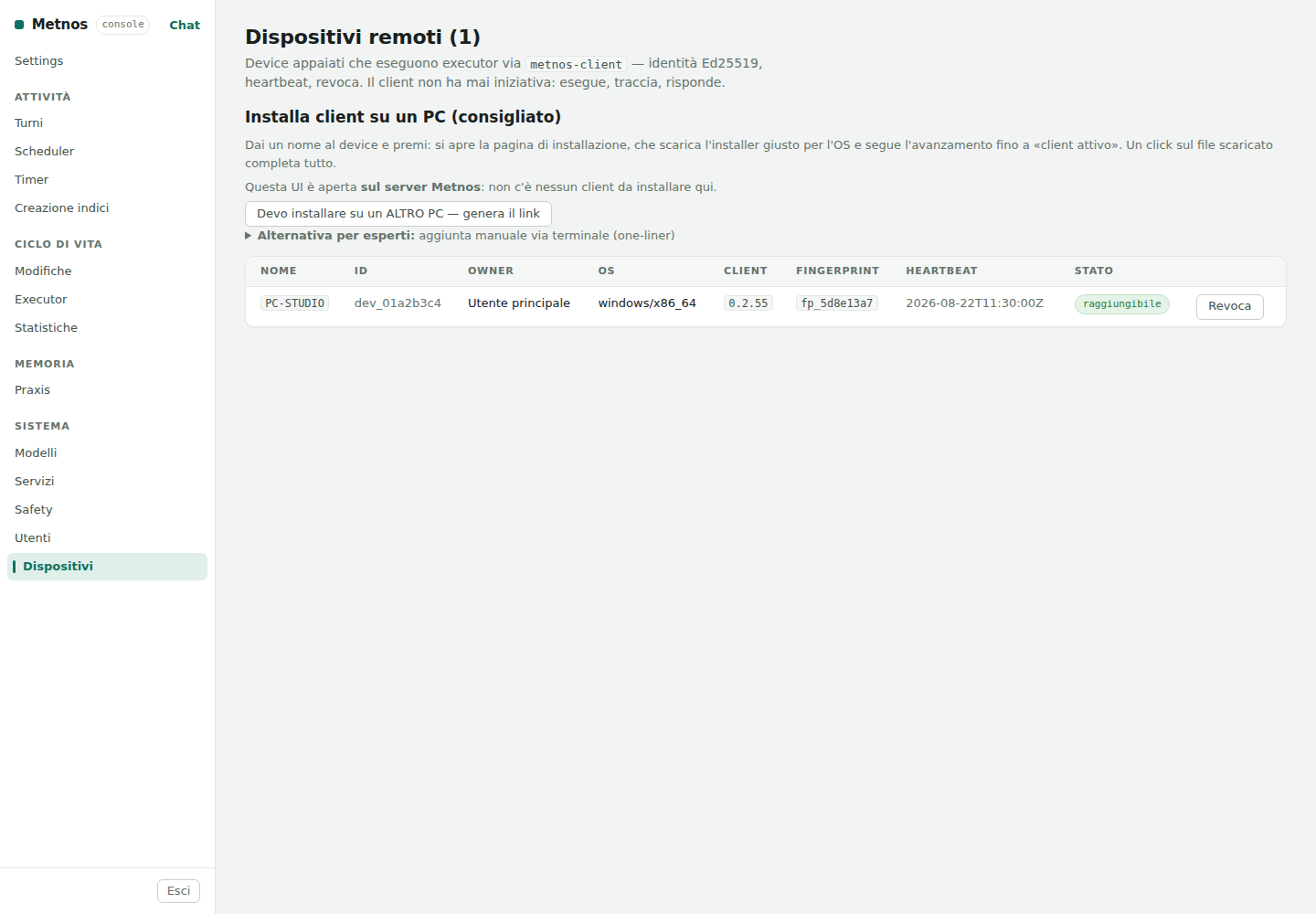
A device is a computer associated with a Metnos user on which remote executors can run. A small component called the Metnos client is installed on the device and communicates with the server. When an action must run on that computer, the server sends the client an authorised, signed request. If the required executor is not already present, the client downloads its signed version and verifies its integrity. It then runs the executor locally within the authorised limits, records the outcome, and returns the result to the server. The executor may remain in a verified cache for later executions.
To pair a new computer, the administrator gives it a recognisable name and selects its owning user. Metnos then creates a link that remains valid for a limited time and must be opened on the computer being paired. The client on that computer creates an Ed25519 cryptographic key pair: the private key stays on the device, while the server records the public key. A digital fingerprint derived from the public key lets the administrator check that Metnos is communicating with the expected device. Once pairing is complete, the temporary link expires; subsequent communications are authenticated with the keys.
A heartbeat is an automatic message that one program sends at regular intervals to tell another that it is still active. The Metnos client sends this message to the server every thirty seconds. It signs the message and includes the device identifier and a small technical profile, such as the operating system, architecture, client version, and available isolation level.
Whenever the server receives a valid heartbeat, it records the time. If the last message is recent, the page marks the device as reachable. This means that the client is running, the network connection works, and the server has verified its identity. It does not mean that every action can run. Metnos separately checks that the device is requesting work, the executor is compatible, and the required resources are available.
An executor's properties are independent:
| Axis | Alternatives | Question it answers |
|---|---|---|
| Placement | Local or remote | On which computer does execution take place? |
| Concurrency | Serial or parallelisable within a limit | How many independent invocations may proceed together? |
| Processing | Deterministic or assisted by an LLM/VLM | Does the function use code and data only, or does it also use a model? |
| Effect | Pure, idempotent, reconcilable, or manual | When may an interrupted attempt be repeated? |
“Remote” therefore does not mean “intelligent”, and “local” does not mean “serial”. A remote executor may perform a deterministic read; a local executor may use a vision model. The central scheduler still applies authority, availability, and concurrency limits.
Revocation invalidates subsequent tokens from that device; it does not delete the owning user's data. A manual path is available for environments without a browser. It is intended for experienced operators and uses a short-lived token.
Network boundary. The device channel is intended for a local network or private overlay. Do not expose the client port directly to the public Internet.
The name, owner, ID, fingerprint, and timestamp are anonymous examples; the layout comes from the real web interface.